Zero-Knowledge Monero Payments in PrestaShop
March 28, 2026 | Karlo Krakan | Updated: March 30, 2026
There was an existing Monero payment module for PrestaShop called MoneroPS. It was one of the first of its kind. But both PrestaShop and Monero have changed fundamentally since it was written, and the module no longer works on a modern stack.
The original module relied on payment IDs, 64-character hex strings appended to transactions to identify which order a payment belonged to. The Monero project deprecated payment IDs years ago. They leak metadata because the ID is visible on-chain. They require the customer to manually include the ID when sending, and many customers don't. Most modern wallets have dropped support for them entirely. Integrated addresses, the workaround that embedded a payment ID inside the address itself, are being phased out too. Building a module around payment IDs means building on a mechanism the Monero ecosystem has actively abandoned.
But replacing payment IDs alone would only give me a module that works. I wanted one that was actually good.
The original module stored payment data everywhere. Subaddresses, amounts, transaction hashes, order mappings, all of it sitting in the database in plain text. It even leaked subaddresses to external QR code APIs, sending the payment address to a third-party server every time the payment page loaded. If someone breached the store, they could look at the orders table and immediately see which customers paid with Monero, trace those payments to specific subaddresses, and potentially link them to on-chain transactions from there. The module facilitated Monero payments, but it did nothing to protect the privacy of the people using them. For a currency whose entire purpose is financial privacy, that is a fundamental failure.
So this became a complete rethinking of what a Monero payment module should store, what it should expose, and what data trail remains after a transaction completes.
The result:
- No crypto data persists on the server. No subaddresses, no XMR amounts, no transaction hashes, no payment IDs, no confirmation counts. Nothing touches the database, session files, cookies, or disk. Payment state exists in PHP memory during the request and in JavaScript memory in the browser. When the request ends or the tab closes, that state is gone.
- Orders are obfuscated to look like bank wire transfers. After payment confirms, the module overwrites
ps_orders.moduletops_wirepaymentand the payment method to "Bank wire." A database dump shows nothing but generic wire transfer orders. No field, no column, no flag identifies any order as a crypto payment. - Timestamps are quantized and jittered. Order creation times are rounded into 6-hour buckets with ±3 hours of random noise applied across
ps_orders,ps_order_payment, andps_order_history. An attacker holding both the database and the wallet cannot correlate order times to blockchain transaction times. - Wallet subaddresses carry no labels. The RPC call that generates each subaddress passes an empty string as the label. A compromised wallet shows a list of subaddresses with zero indication of which customer, which order, or which amount maps to which address.
- QR codes are generated locally. The payment page renders QR codes on a
<canvas>element using a JavaScript encoder embedded directly in the template. No external API call. No subaddress leaked to a third-party service. - The only record linking an order to a payment is a receipt the customer copies from their browser. The server does not keep a copy. If the customer loses it, the link between order and payment ceases to exist.
Every one of these decisions stems from the same question: if someone gained access to this server tomorrow, through a breach, a compromised backup, or a rogue hosting employee, what would they learn about which customers paid with Monero? The answer should be nothing.
What Changed and Why
Subaddresses Instead of Payment IDs
This is the most important architectural change.
The original module used Monero payment IDs, 64-character hex strings appended to each transaction to identify which order a payment belonged to. Payment IDs were deprecated by the Monero project years ago. They leak metadata because the ID is visible on-chain. They require extra action from the customer, since the ID must be included when sending. Many wallets no longer support them, and integrated addresses (the workaround) are being phased out too.
The new approach is one subaddress per order. When a customer initiates payment, the module calls create_address on the wallet RPC to generate a fresh subaddress under account 0 with an empty label. Each subaddress is unique to that payment session, so no payment ID is needed. The address itself identifies the payment. There is no store configuration of a "primary address" required. Subaddresses are unlinkable to each other on-chain, preserving privacy.
The empty label is deliberate. If an attacker compromises both the database (getting RPC credentials) and the wallet, labeled subaddresses would let them map orders to payments. Empty labels mean the wallet contains a list of subaddresses with no indication of which customer or order used which one.
The subaddress index (always greater than 0, since index 0 is the primary address) is used to query get_transfers with subaddr_indices filtering, making payment verification precise and efficient.
The Ephemeral Problem
The obvious place to put payment state (subaddress, amount, cart mapping) is the session or the database. But both are persistent stores. Subaddresses and cart mappings sitting in /tmp/sess_* files or in a monero_payments table are exactly the kind of residual data this module is designed to eliminate.
The question that shaped the architecture: what if the server never stored any crypto payment data at all? Not in the database, not in cookies, not in session files, not in temporary files. What if every piece of payment state existed only in PHP memory during the request and in the browser's JavaScript memory between requests, both freed automatically when the request ends or the tab closes?
HMAC-Signed Tokens
The core mechanism is an HMAC-SHA256 signed token. When the payment controller generates a subaddress and calculates the XMR amount, it packs four values (cart ID, subaddress index, atomic XMR amount, and a timestamp) into a JSON payload, signs it with a 32-byte key, and base64-encodes the result. This token is passed to the template as a Smarty variable and rendered into a JavaScript constant inside a self-contained IIFE.
The token never touches cookies, localStorage, sessionStorage, IndexedDB, or any browser persistence API. It exists only as a JavaScript variable in memory. When the browser tab closes, it is gone. When the PHP request ends, the server-side variables are freed. Between those two events, the token is the only thing linking the customer's browser to the payment details.
The HMAC key is auto-generated during module installation via bin2hex(random_bytes(32)) and stored in PrestaShop's ps_configuration table. No environment variables, no Docker secrets, no separate key files. It's a 64-character hex string that lives alongside the RPC credentials the admin already configured. The key protects against token tampering in transit (XSS, MITM, browser extensions). It does not protect data at rest because there is no data at rest.
The token has a configurable TTL (default 30 minutes). If the customer doesn't complete payment within that window, the token expires and they need to start a new payment session with a fresh subaddress.
AJAX Polling Instead of Page Refresh
A naive approach to checking payment status is setTimeout(location.reload()). It flashes the whole page, loses scroll position, and destroys all in-memory state on each reload.
The new payment page uses fetch() to POST the HMAC token to a dedicated callback controller every 30 seconds. The callback verifies the token signature and TTL, confirms the cart belongs to the current customer, then queries the blockchain via get_transfers filtered by the subaddress index. It returns a JSON response with the payment status.
The browser-side JavaScript updates the UI in place: an info alert for "awaiting payment," a warning alert with a progress bar showing confirmations, and a success alert with the receipt when payment is confirmed. No page reloads. The token stays safely in its IIFE scope the entire time.
Order Identity Obfuscation
This is where things get interesting.
PrestaShop's validateOrder() writes the module name into ps_orders.module, the payment method string into ps_orders.payment, and the payment method into ps_order_payment.payment_method. If the module is called "monero" and the payment string says "Pay with Monero (XMR)," then anyone with database read access (a hosting provider, a compromised admin account, a leaked backup) can trivially run SELECT * FROM ps_orders WHERE module = 'monero' and identify every crypto customer.
You cannot override this behavior inside validateOrder(). The method hardcodes $this->name as the module value. So the module does two things.
First, it passes 'Bank wire' as the payment method string to validateOrder(), which controls ps_orders.payment and ps_order_payment.payment_method.
Second, immediately after order creation, it runs direct SQL updates to overwrite ps_orders.module from 'monero' to 'ps_wirepayment' and confirms ps_orders.payment is set to 'Bank wire'. It also updates ps_order_payment.payment_method to 'Bank wire' using the order reference.
The result: a Monero payment order is completely indistinguishable from a bank wire order in the database. The admin panel shows "Bank wire." Order confirmation emails say "Bank wire." Invoices say "Bank wire." There is no column, no log entry, no hook output that reveals cryptocurrency was involved.
This intentionally breaks hookPaymentReturn and hookDisplayPDFInvoice for the monero module. Those hooks are never registered. Since the order now claims to belong to ps_wirepayment, PrestaShop's built-in wire payment module handles the confirmation page display if it's installed.
Customer-Side Receipt
With zero server-side data and obfuscated order identity, the obvious question is: how does anyone reconcile an order with a payment? How do refunds work? How is overpayment handled?
The answer is a customer-side receipt. When the callback controller confirms payment and creates the order, it returns a JSON response containing the order reference, the subaddress, the expected XMR amount, the received XMR amount, whether an overpayment occurred, a timestamp, and an HMAC-SHA256 signature over the receipt content. The browser renders this as a formatted text receipt on screen.
This receipt is the only record in existence linking the PrestaShop order to the Monero subaddress. The server does not keep a copy. The wallet does not know which order used which subaddress. If the customer loses the receipt, the link is permanently gone.
Confirmation Gate
Before the QR code and payment details are revealed, the customer must acknowledge a confirmation screen. It explains four things:
- Do not close the tab. The payment session lives only in browser memory. Closing the tab destroys it permanently.
- Download the signed receipt after payment. It is the only server-verified record linking the order to the Monero transaction.
- The store needs the receipt for refunds and overpayments. Without it, there is no way to verify the claim.
- The subaddress in your wallet helps too. The address recorded in the customer's wallet transaction history can also be used to support refund or overpayment claims. However, since the store only records order totals in fiat currency, small overpayments may not be honored without the signed receipt as proof of the exact XMR amount sent.
The customer must check an acknowledgment checkbox before the "Proceed to Payment" button activates.
Signed Receipts and Download-Only Access
The receipt displayed on screen after payment is not copyable. The text is rendered with user-select: none, and copy, context menu, and select events are blocked. The only way to save the receipt is the "Download Signed Receipt" button, which produces a .txt file containing the receipt data and its cryptographic signature.
The signature is an HMAC-SHA256 hash computed over the canonical receipt text using the same key that signs payment tokens. If a customer contacts the store with a receipt claiming overpayment or requesting a refund, the admin can verify the receipt's authenticity by calling MoneroToken::verifyReceipt($receiptText, $signature). A forged or tampered receipt will fail verification.
This design ensures that the customer gets exactly one artifact — a signed file — and that the store has a cryptographic way to distinguish genuine receipts from fabricated ones, without storing any receipt data server-side.
For overpayment refunds, the customer contacts the store with their signed receipt. The store verifies the signature, then confirms the claim by checking the subaddress on the blockchain with the view key. The refund itself is processed outside the module because the wallet is view-only and cannot spend.
View-Only Wallet Architecture
The module operates with a view-only wallet. It holds the secret view key but not the spend key. This means the store can detect incoming payments because the view key allows decrypting transaction outputs. However, the store cannot spend funds because the spend key is absent, keeping funds safe even if the server is fully compromised. The wallet-rpc can still generate subaddresses since that only requires the view key.
This is the correct security model for a payment gateway. The spend key should never touch the server.
Wallet RPC Requirements
The module expects a running monero-wallet-rpc instance loaded with a view-only wallet. The RPC must be reachable from the PrestaShop server over HTTP. The admin configuration panel exposes six fields: the wallet RPC host URL (for example http://monero-wallet-rpc:18082), the RPC username, the RPC password, required confirmations, exchange rate cache TTL, and payment token TTL.
The RPC instance must have digest authentication enabled via --rpc-login. The WalletRpcClient class uses cURL's CURLAUTH_DIGEST to authenticate every request with the credentials configured in the admin panel. If the RPC username or password fields are left empty, the module refuses to show the payment option at checkout.
The module uses three RPC methods: create_address (generate a new subaddress under account 0 with an empty label), get_transfers (check for incoming payments filtered by subaddress index), and get_address (retrieve a subaddress string by index for the receipt). All three are available on a view-only wallet and do not require the spend key.
Timing Correlation Mitigation
Obfuscating the module name and payment method from the database is not enough on its own. An adversary with both database access and blockchain visibility can correlate orders by timestamp. Find ps_orders.date_add = 2026-03-28 14:32:05, scan the blockchain for transactions to the wallet's subaddresses around that time, and that narrows down the match considerably.
To mitigate this, the obfuscation routine applies a quantize + jitter transformation to all order timestamps. The real time() value is first rounded to the nearest 6-hour bucket (00:00, 06:00, 12:00, 18:00). Then a cryptographically random offset between -3 and +3 hours is added. The result is clamped so it never lands in the future. This obfuscated timestamp overwrites date_add in three tables: ps_orders, ps_order_payment, and ps_order_history.
The practical effect: all orders within a roughly 6-hour window become indistinguishable by timestamp. An adversary sees an order placed at 09:17, but the real payment could have happened anywhere between 06:00 and 18:00.
The honest caveat is that this helps proportionally to order volume. A store processing 50 orders per day has a large anonymity set per bucket. A store processing 2 orders per day has a small one. Timestamp jitter does not create anonymity from nothing. It makes the match harder to narrow down, but the fundamental limit is the number of orders per time window. For low-volume stores, the ±3 hour jitter still forces an adversary to consider every order in a roughly 6-hour window instead of pinpointing the exact minute.
The trade-off is that order timestamps in the admin panel are no longer precise. Orders may appear slightly out of chronological sequence. For most stores this is a minor cosmetic issue. For stores where exact order timing matters operationally, the jitter range could be reduced in the code.
Exchange Rate Caching and Precision
Fiat-to-XMR conversion uses the CryptoCompare API with a configurable cache TTL (default 5 minutes). Rates for all supported currencies (USD, EUR, CAD, GBP, INR, BTC) are fetched in a single API call and cached in ps_configuration as JSON with a timestamp. Subsequent requests within the TTL window read from cache without making an API call.
All XMR amount arithmetic uses bcmath with explicit scale parameters. Fiat amounts are divided by the XMR price to 12 decimal places, then multiplied by 10^12 to get atomic units (piconero). This avoids floating-point rounding errors that could lead to underpayment or overpayment detection failures. The atomic unit string is what gets signed into the HMAC token and compared against blockchain data.
Payment Flow
The customer selects "Pay with Monero (XMR)" at checkout. The payment controller connects to wallet-rpc, generates a fresh subaddress with an empty label, converts the cart total to XMR atomic units via bcmath, creates an HMAC-signed token embedding the cart ID, subaddress index, atomic amount, and timestamp, then renders the payment page. Nothing is written to the database, session, or filesystem.
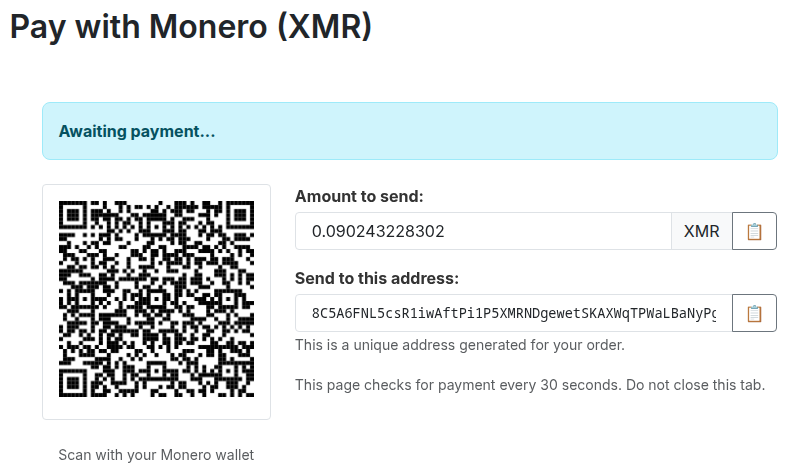
The payment page displays the subaddress, the XMR amount, a locally-generated QR code rendered on a canvas element with no external API calls, and copy buttons. Every 30 seconds, the browser's JavaScript POSTs the HMAC token to the callback endpoint.
The callback controller verifies the token signature and TTL, confirms the cart belongs to the current customer and has not already been converted to an order, then queries get_transfers filtered by the subaddress index. It checks confirmed transfers against the configurable confirmation threshold and sums mempool transactions separately.
If payment is pending (nothing received yet), we return a status update. If confirming (funds in mempool or below the confirmation threshold), we return the confirmation count and the required count so the browser can render a progress bar. If paid (confirmed amount meets or exceeds the expected amount), we create the order.
Order creation calls validateOrder() with 'Bank wire' as the payment method, then immediately obfuscates ps_orders.module to 'ps_wirepayment', confirms all payment method strings are set to 'Bank wire', and applies the quantize + jitter transformation to date_add across ps_orders, ps_order_payment, and ps_order_history (rounding to the nearest 6-hour bucket, then adding ±3 hours of random offset). The callback returns a JSON receipt containing the order reference, the subaddress, the amounts, an overpayment flag, and a redirect URL to PrestaShop's standard order confirmation page.
The browser renders the receipt, shows a copy button, and displays a "Continue" link. If overpayment was detected, a warning explains the excess amount and asks the customer to save their receipt for refund purposes.
If the RPC is unreachable or subaddress generation fails, the module does not fall back to a shared address. It shows an error page and blocks the payment entirely. This prevents the dangerous scenario where multiple orders share a single address, making payment matching impossible.
What This Breaks (Intentionally)
Order obfuscating to ps_wirepayment means PrestaShop's admin panel shows "Bank wire" for Monero orders. There is no way to distinguish them from actual wire transfers in the back office. The hookPaymentReturn confirmation hook is not registered, so the module never renders crypto-specific content on the order confirmation page. Invoice PDFs say "Bank wire." Order history says "Bank wire."
This is a deliberate trade-off. If you need an admin panel that shows "this order was paid with XMR to subaddress 8A3f..." then this module is not for you. If your priority is protecting your customers, ensuring that a database breach or a compromised hosting provider cannot reveal which customers paid with Monero or link their orders to on-chain transactions, then this is exactly what you want.
Yes, the store accepts Monero. Anyone visiting the checkout page can see that. But nobody can look at the database after the fact and determine that customer #4821's order on Tuesday was a crypto payment, or trace it back to a specific subaddress, or from there to a wallet. The storefront is public. The payment records are private.
What the Threat Model Actually Looks Like
It is worth being explicit about what this design defends against and where it falls short.
Database breach. An attacker dumps ps_orders, ps_order_payment, ps_order_history, ps_configuration. They find orders marked "Bank wire" paid via "Bank wire." They find RPC credentials and an HMAC key. The HMAC key is useless because there are no tokens stored anywhere to verify against. The RPC credentials provide access to a view-only wallet containing a list of subaddresses with empty labels and no order mappings. Nothing in the database connects any customer to any on-chain transaction.
Wallet compromise (view-only). The attacker has the wallet file or the view key. They can see every incoming transaction to every subaddress. But they cannot map subaddresses to orders or customers because the wallet labels are empty and the server never stored that mapping. They can see that money arrived. They cannot determine whose order it was for.
Database and wallet combined. Even with both in hand, the link is broken. The database contains orders with fake timestamps and generic payment methods. The wallet contains subaddresses with real timestamps but no labels. The attacker would need to perform statistical timing analysis across quantized and jittered order timestamps and blockchain transaction times, and the anonymity set scales with order volume.
What this does not protect against. A live attacker with root access on the server, watching PHP memory in real time as payments are processed. An attacker who compromises the customer's browser and reads the HMAC token from JavaScript memory. Traffic analysis at the network level, correlating the customer's session with wallet-rpc calls (mitigated by keeping wallet-rpc on an internal Docker network with no external port mapping, but not eliminated). These are all active, real-time attacks rather than analysis of stored data, and they fall outside the scope of what a PrestaShop module can reasonably defend against.
The goal was never to build an unbreakable system. The goal was to ensure that the most common and most likely threat, someone gaining access to the store's database through a breach or a compromised backup, reveals nothing about who paid with cryptocurrency.
The module is available at gitlab.karlokrakan.me/monerogive/monero-prestashop.
Ephemeral subaddress payments, HMAC-signed tokens, and zero crypto data at rest.